Robotic Process Automation (RPA) has evolved far beyond simple rule-based macros. By integrating AI capabilities – natural language processing, computer vision, and large language models – organizations are now achieving levels of process intelligence that were previously unimaginable. In this expanded guide, we explore how Microsoft's Power Automate platform is leading this transformation, why it offers a dramatically better value proposition than legacy RPA tools like UiPath, and how AI Builder and Copilot are revolutionizing document processing for operations teams.
From RPA to Intelligent Automation
Traditional RPA excels at repetitive, rule-based tasks – clicking buttons, copying data between systems, filling out forms. But the real world is messy: documents arrive in inconsistent formats, emails require interpretation, and decisions depend on context. First-generation RPA bots broke easily when a UI changed or an edge case appeared. The next wave – Intelligent Automation (IA) – combines RPA's execution power with AI's ability to understand, learn, and adapt.
The shift from RPA to IA is not just a technology upgrade; it's a strategic transformation. Where RPA automates tasks, IA automates entire processes end-to-end, including the judgment calls in between. Natural language processing lets bots read and understand emails, contracts, and support tickets. Computer vision enables them to interpret scanned documents, screenshots, and even legacy terminal screens. Machine learning models can classify, predict, and recommend – turning rigid scripts into adaptive workflows that improve over time.
Power Automate: The Platform for Modern Automation
Microsoft Power Automate has emerged as the dominant platform for intelligent automation, particularly in enterprises already invested in the Microsoft 365 ecosystem. Unlike UiPath or Automation Anywhere, Power Automate is not a standalone RPA product bolted onto your infrastructure – it is deeply integrated into the tools your teams already use every day: Outlook, Teams, SharePoint, Excel, Dynamics 365, and the entire Azure ecosystem.
Power Automate offers two complementary engines:
Cloud Flows – API-based automations that connect hundreds of SaaS applications through pre-built connectors. These run entirely in the cloud, require no desktop infrastructure, and scale automatically. A cloud flow can trigger when an email arrives, extract an attachment, process it with AI Builder, update a SharePoint list, send a Teams notification, and log the result in Dataverse – all without writing a single line of code.
Power Automate Desktop (PAD) – A full desktop RPA engine that can automate legacy applications, terminal emulators, SAP transactions, Citrix sessions, and any Windows application with a UI. PAD records and replays user interactions, but with AI-enhanced capabilities: it can use OCR to read screen elements, handle dynamic UI changes, and integrate seamlessly with cloud flows for hybrid automations that bridge old and new systems.
Power Automate vs. UiPath: The Cost and Value Equation
For organizations evaluating automation platforms, cost is a critical factor – and this is where Power Automate delivers a decisive advantage. UiPath's licensing model is notoriously expensive: attended robot licenses, unattended robot licenses, Orchestrator fees, AI Center add-ons, and per-user Studio licenses quickly add up to six- or seven-figure annual costs for enterprise deployments. A single unattended UiPath robot can cost $8,000–$12,000 per year, and Orchestrator licensing pushes the total even higher.
Power Automate, by contrast, is included in many Microsoft 365 plans that organizations already pay for. The "seeded" use rights bundled with Office 365 E3/E5 and Dynamics 365 licenses allow users to automate workflows within those apps at no additional cost. For more advanced scenarios, the Power Automate Premium plan (approximately $15/user/month) unlocks desktop flows, premium connectors, AI Builder credits, and Dataverse storage – a fraction of what comparable UiPath capabilities would cost.
Key cost advantages of Power Automate in an Office 365 environment:
No separate infrastructure. Cloud flows run on Microsoft's infrastructure. Desktop flows run on existing Windows machines. There's no need to provision dedicated RPA servers, Orchestrator instances, or specialized VMs – a major hidden cost with UiPath deployments.
No specialized developers required. Power Automate's low-code designer is accessible to business analysts, operations staff, and power users – not just professional developers. This democratization of automation means faster delivery and lower labor costs. UiPath Studio, while powerful, has a steep learning curve and typically requires trained RPA developers.
Native integration eliminates connector costs. Connecting to SharePoint, Teams, Outlook, OneDrive, Excel, Dynamics 365, Azure SQL, and hundreds of other Microsoft services is seamless and included. With UiPath, integrating with Microsoft services often requires custom activities, API configurations, or third-party connectors – each adding complexity and cost.
AI capabilities included. AI Builder – Microsoft's no-code AI service – is bundled with Power Automate Premium. It provides pre-built models for document processing, sentiment analysis, object detection, text classification, and more. UiPath's equivalent (Document Understanding, AI Center) requires separate licensing and significant setup effort.
Governance and security built-in. Power Automate inherits Microsoft 365's security model, including Azure Active Directory, Conditional Access, Data Loss Prevention (DLP) policies, and compliance certifications. IT teams don't need to build a separate governance framework – it's already there.
The Power Automate Platform Architecture
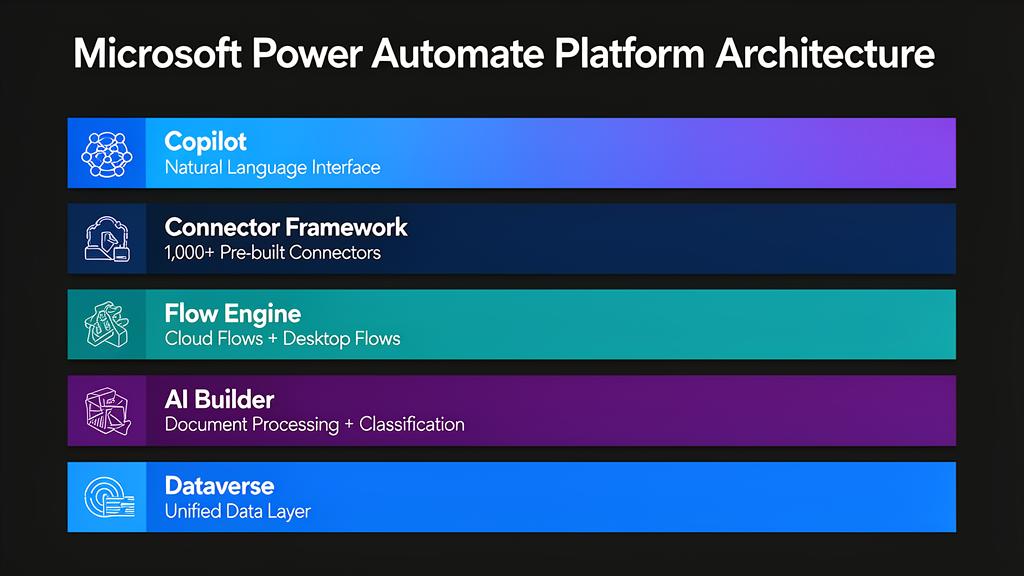
Understanding the Power Automate platform architecture helps illustrate why it is so effective for operations teams. The platform consists of several interconnected layers that work together to deliver end-to-end automation:
At the foundation, Dataverse serves as the unified data layer – a secure, scalable database that stores business data, flow definitions, and AI models. Above it, the Connector Framework provides 1,000+ pre-built connectors to Microsoft services, third-party SaaS applications, and custom APIs. The Flow Engine orchestrates both cloud flows and desktop flows, handling triggers, conditions, loops, error handling, and parallel execution. AI Builder sits alongside, providing no-code AI models that can be embedded directly into flows. Power Automate Desktop extends automation to legacy desktop applications. And Copilot adds a natural language layer, allowing users to describe automations in plain English and have the platform build them.
This architecture means operations teams can build automations that span cloud services and desktop applications in a single workflow, with AI processing in between – something that would require multiple products and complex integrations in a UiPath-based architecture.
Why Operations Teams Benefit Most
Operations teams are uniquely positioned to benefit from intelligent automation – and Power Automate is uniquely suited to serve them. Here's why:
Multi-system complexity. Operations teams typically work across 5–15 different systems daily: ERP (SAP, Oracle, Dynamics), CRM, email, spreadsheets, ticketing systems, document management platforms, legacy databases, and specialized industry applications. Each system has its own login, UI, and data format. Staff spend enormous amounts of time manually transferring data between systems, reconciling records, and performing repetitive checks. Power Automate can bridge all these systems – cloud connectors for modern apps, desktop flows for legacy systems – creating unified, automated workflows that eliminate manual data entry and reduce errors.
High-volume, repetitive processes. Operations teams handle processes like invoice processing, order management, report generation, compliance checks, customer onboarding, and data reconciliation – often hundreds or thousands of times per month. These are ideal automation candidates. A single Power Automate flow can process an invoice from email receipt to ERP booking in minutes, with AI Builder extracting data and validation rules ensuring accuracy.
Error reduction and compliance. Manual data entry across multiple systems is inherently error-prone. A mistyped account number, a missed decimal point, or a skipped validation step can cascade into significant problems. Automated flows execute consistently every time, following defined rules without fatigue or distraction. They also create audit trails automatically – every action is logged, timestamped, and traceable, which is invaluable for compliance and regulatory reporting.
Speed and responsiveness. Automated processes run 24/7 without breaks. An invoice that arrives at 11 PM is processed immediately, not the next morning. A customer request submitted on Friday evening gets routed, classified, and acknowledged within seconds. This always-on capability transforms SLA compliance and customer satisfaction.
Employee satisfaction and retention. Operations staff who spend their days copying data between spreadsheets and systems are disengaged and prone to burnout. Automation frees them to focus on exception handling, process improvement, customer relationships, and strategic analysis – work that is more fulfilling and higher-value. Organizations that deploy automation in operations consistently report improved employee morale and reduced turnover.
Scalability without headcount. As business volumes grow, operations teams face a difficult choice: hire more staff or fall behind. Automation provides a third option – scale processes without proportional headcount increases. A Power Automate flow that processes 100 invoices per day can handle 10,000 with the same infrastructure and zero additional labor cost.
Document Processing Revolution: AI Builder and Copilot
Document processing has historically been one of the most labor-intensive tasks in operations. Invoices, purchase orders, contracts, receipts, shipping documents, compliance forms – these arrive in countless formats from hundreds of vendors, and extracting structured data from them has traditionally required manual effort or expensive, brittle OCR solutions.
AI Builder fundamentally changes this equation. It is Microsoft's no-code AI service, integrated directly into Power Automate and Power Apps, that lets business users build and deploy AI models without any machine learning expertise. For document processing, AI Builder offers several powerful capabilities:
Pre-built document models can extract data from common document types – invoices, receipts, business cards, ID documents, and tax forms – out of the box, with no training required. You simply feed the document into the model, and it returns structured fields: vendor name, invoice number, line items, totals, dates, tax amounts, and more. Accuracy rates typically exceed 90% even on the first run, and improve with feedback.
Custom document models allow you to train AI Builder on your specific document types. If your operations team processes specialized forms – insurance claims, loan applications, customs declarations, lab reports – you can upload sample documents, tag the fields you want to extract, and train a model in hours, not weeks. The model learns your document layouts and handles variations (different vendors, formats, languages) intelligently.
Intelligent classification lets AI Builder automatically sort incoming documents by type before processing them. A single mailbox might receive invoices, contracts, delivery notes, and correspondence – AI Builder can classify each document and route it to the appropriate processing flow, eliminating manual triage.
Copilot: Natural Language Automation
Microsoft Copilot integration in Power Automate represents the next frontier of intelligent automation. Copilot brings generative AI directly into the automation platform, enabling capabilities that were impossible just two years ago:
Describe-to-create flows. Users can describe what they want to automate in plain English – "When I receive an invoice by email, extract the vendor name and amount, check if the vendor exists in our ERP, and if the amount is under $5,000, auto-approve it and post to the finance system" – and Copilot will generate the complete flow, including connectors, conditions, and error handling. This dramatically accelerates development and makes automation accessible to non-technical users.
Intelligent document summarization. Copilot can summarize lengthy contracts, reports, or correspondence, extracting key terms, obligations, deadlines, and action items. Combined with AI Builder's field extraction, this creates a powerful document understanding pipeline: AI Builder extracts structured data, while Copilot provides contextual summaries and insights.
Conversational data queries. Operations managers can ask Copilot questions about their automated processes in natural language: "How many invoices were processed last week?", "Which vendors have the highest rejection rate?", "Show me all orders that missed their SLA this month." Copilot translates these queries into Dataverse lookups and returns answers instantly.
Flow debugging and optimization. When a flow fails or performs poorly, Copilot can analyze the error, explain what went wrong in plain language, and suggest fixes. It can also review existing flows and recommend optimizations – consolidating redundant steps, adding error handling, or suggesting more efficient connector usage.
Email and document drafting. Copilot can generate contextual responses as part of automated workflows. For example, when a flow detects a discrepancy in an invoice, Copilot can draft a professional email to the vendor requesting clarification, pre-filled with the specific details of the discrepancy – saving operations staff from writing repetitive correspondence.
Real-World Impact: The Combined Power of AI Builder + Copilot
Consider a typical accounts payable process. Before automation, a single invoice might touch 5–8 people and take 3–5 days from receipt to payment. With Power Automate, AI Builder, and Copilot working together:
1. An invoice arrives by email. Power Automate triggers automatically.
2. AI Builder classifies the document (invoice vs. credit note vs. statement) and extracts all relevant fields.
3. The flow validates extracted data against the ERP – matching PO numbers, verifying vendor details, checking amounts against contracts.
4. If everything matches, the invoice is auto-posted and queued for payment. If there's a discrepancy, Copilot drafts a clarification email and routes the exception to the appropriate team member.
5. The entire process takes minutes, not days. Error rates drop by 80–90%. Staff handle only the exceptions that truly require human judgment.
This is not a theoretical scenario – it's being implemented today by organizations across industries, from financial services to manufacturing to healthcare, using tools that are already part of their Microsoft 365 subscriptions.
Process Mining and Optimization
Beyond building automations, AI algorithms can analyze process logs to identify bottlenecks, predict failures, and recommend optimization strategies. Microsoft's Process Mining capability, integrated into Power Automate, allows organizations to visualize how processes actually run (as opposed to how they're documented), identify deviations, and quantify the time and cost savings potential of automation. This data-driven approach ensures continuous improvement: as processes evolve, the AI identifies new automation opportunities and flags areas where existing flows could be optimized.
Beyond Automation: Domain-Specific Agentic AI
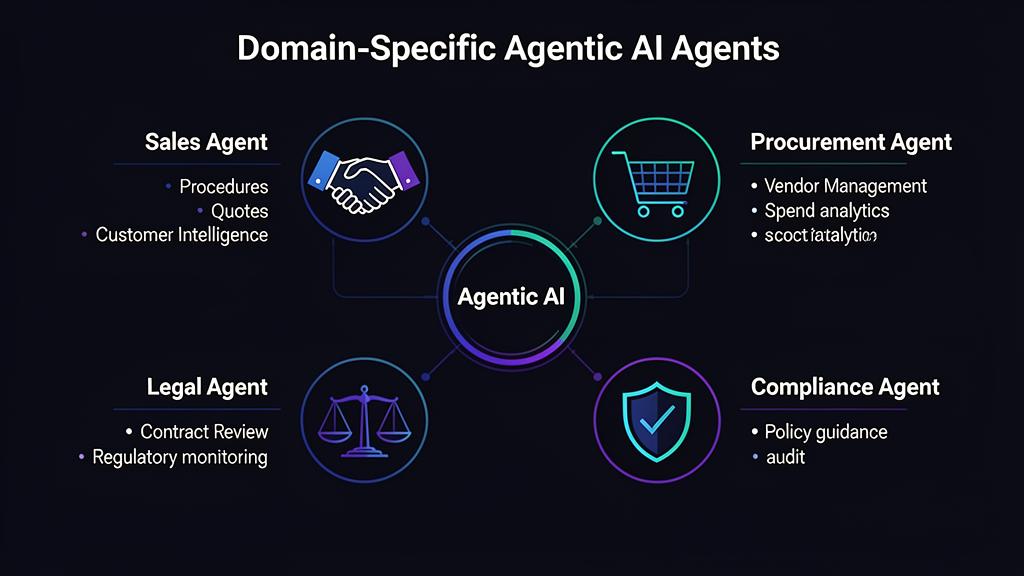
The future of intelligent automation extends far beyond scripted workflows and rule-based bots. The next frontier is Agentic AI – autonomous, domain-specialized AI agents that don't just execute predefined steps but actively reason, plan, and take action within specific business domains. Unlike traditional automation that follows a fixed script, agentic AI systems can interpret ambiguous requests, break complex problems into sub-tasks, consult multiple data sources, and make context-aware decisions – escalating to humans only when genuinely necessary.
This shift from "automation" to "agency" is transformative. Where RPA and even intelligent automation require someone to design every workflow path in advance, agentic AI can handle novel situations by applying domain knowledge and reasoning capabilities. Think of it as the difference between a GPS that follows a pre-programmed route and one that dynamically reroutes based on real-time traffic, road closures, and your personal preferences.
Sales Agent: Procedures, Knowledge, and Customer Intelligence
A domain-specific AI agent for sales teams can revolutionize how organizations manage their sales processes. Unlike a simple FAQ chatbot, a Sales AI Agent understands the full context of your sales procedures, product catalog, pricing rules, discount policies, and customer history. It acts as an always-available expert assistant for every salesperson on the team.
Procedure guidance in real time. Sales teams often struggle with complex approval processes – discount thresholds, contract terms, compliance requirements, escalation paths. A sales agent can instantly guide a rep through the correct procedure: "For a discount above 15%, you need VP approval. Based on this customer's annual spend of €2.3M, they qualify for Tier 2 pricing. I've pre-filled the approval request – shall I submit it?" This eliminates the back-and-forth emails and the risk of reps applying incorrect policies.
Proposal and quote generation. The agent can generate tailored proposals by pulling product specifications, pricing, terms and conditions, and customer-specific agreements from multiple systems. It understands which products are compatible, which bundles offer the best margin, and which terms are non-negotiable vs. flexible. A task that might take a sales rep 2–3 hours can be completed in minutes.
Customer intelligence and next-best-action. By analyzing CRM data, interaction history, purchase patterns, and even sentiment from email threads, the sales agent can recommend the optimal next action: "This customer hasn't reordered in 45 days – their typical cycle is 30 days. Their last support ticket mentioned dissatisfaction with delivery times. Recommend reaching out with an expedited shipping offer before they explore alternatives."
Competitive intelligence. The agent can monitor and synthesize market information, helping reps position against competitors by providing real-time battle cards, differentiators, and objection-handling scripts tailored to the specific deal context.
Procurement Agent: Streamlining Purchasing and Vendor Management
Procurement departments deal with enormous complexity: thousands of suppliers, contracts with varying terms, compliance requirements, approval hierarchies, and the constant pressure to reduce costs while maintaining quality. A Procurement AI Agent can transform this function:
Intelligent purchase request handling. When an employee submits a purchase request, the agent can automatically identify the best supplier based on existing contracts, pricing, delivery times, and quality ratings. It checks budget availability, validates against spending policies, and routes for the appropriate level of approval – all within seconds. For routine purchases under a threshold, it can auto-approve and place the order directly.
Contract analysis and negotiation support. The agent can review supplier contracts, highlight unfavorable clauses, compare terms across vendors, and suggest negotiation points. "This supplier's payment terms are Net-60, but three comparable vendors offer Net-90 with similar pricing. Here's a draft counter-proposal." It can also track contract expiration dates and trigger renewal processes proactively.
Spend analytics and savings identification. By analyzing purchasing patterns across the organization, the agent identifies consolidation opportunities, maverick spending (purchases outside contracted terms), and potential savings. "Five departments are buying similar office supplies from four different vendors. Consolidating to a single contract could save €180K annually."
Supplier risk monitoring. The agent continuously monitors supplier health indicators – financial stability, delivery performance, quality metrics, compliance certifications, and even news sentiment – alerting procurement teams to potential risks before they become problems.
Legal and Compliance Agent: Risk Mitigation at Scale
Legal and compliance departments are drowning in documents, regulations, and review requests. Every contract, policy change, regulatory update, and internal request requires careful analysis – work that is simultaneously critical and time-consuming. A Legal & Compliance AI Agent addresses this bottleneck:
Contract review and risk assessment. The agent can review contracts against your organization's standard terms, flagging deviations, risky clauses, and missing protections. "Section 7.3 contains an unlimited liability clause – your standard template caps liability at 2x contract value. Section 12.1 is missing a data processing addendum required for GDPR compliance." This doesn't replace legal judgment, but it dramatically accelerates the first-pass review, allowing lawyers to focus on the issues that matter.
Regulatory change monitoring. The agent tracks regulatory changes across relevant jurisdictions and industries, assessing their impact on your organization. When a new regulation is published, the agent analyzes your existing policies and procedures, identifies gaps, and recommends specific updates. This proactive approach replaces the reactive scramble that many compliance teams currently face.
Policy Q&A and guidance. Employees across the organization constantly have compliance questions: "Can I accept this gift from a vendor?", "What's the data retention policy for customer emails?", "Do I need approval to share this report with a partner?" The compliance agent provides instant, accurate answers based on your actual policies – not generic advice – with citations to the specific policy section, reducing the volume of requests that reach the compliance team.
Audit preparation and evidence gathering. When an audit approaches, the agent can automatically compile required evidence, identify documentation gaps, and generate compliance reports. Tasks that previously took weeks of manual effort across multiple departments can be completed in days.
Whistleblower and incident management. The agent can serve as a secure, confidential channel for reporting compliance concerns, automatically classifying incidents by severity, routing to appropriate investigators, and tracking resolution timelines – all while maintaining the anonymity protections required by regulations like the EU Whistleblower Directive.
Chatbots: The Frontline of Customer and Employee Interaction
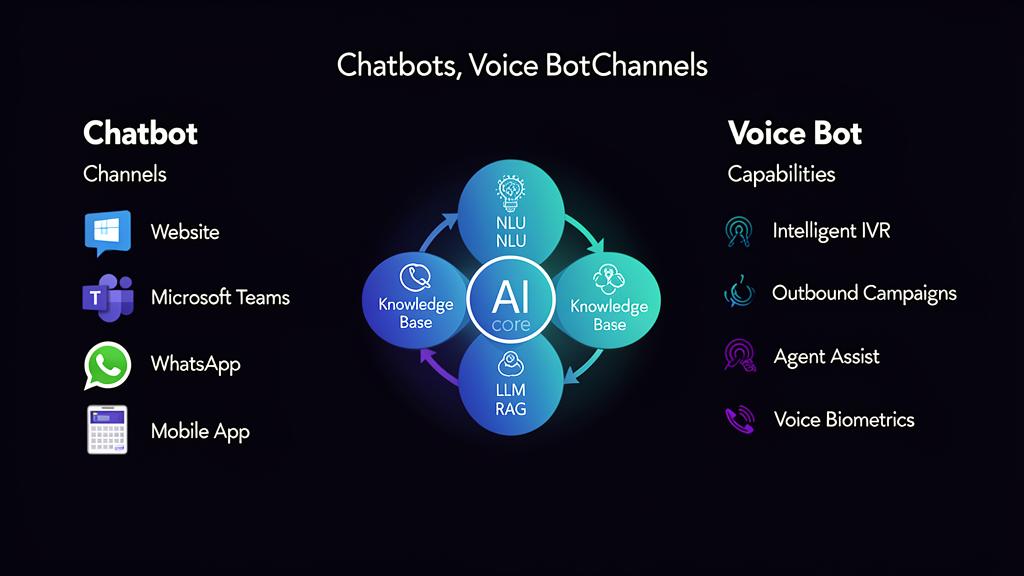
AI-powered chatbots have evolved dramatically from the frustrating, script-based systems of the past. Modern chatbots, powered by large language models (LLMs) and retrieval-augmented generation (RAG), can hold natural, contextual conversations while drawing on vast knowledge bases. They serve as the primary interface through which employees and customers interact with agentic AI systems.
Customer-facing chatbots can handle complex, multi-turn conversations: checking order status, processing returns, troubleshooting product issues, scheduling appointments, and answering detailed product questions – all while maintaining context across the conversation. When a customer says "Actually, I meant the order from last week, not this one," the chatbot understands the correction and adjusts. When an issue exceeds its capabilities, it transfers to a human agent with the full conversation context, so the customer never has to repeat themselves.
Internal employee chatbots serve as the single point of access for organizational knowledge. Instead of searching through SharePoint sites, policy documents, and intranet pages, employees simply ask: "What's our travel expense policy for international trips?", "How do I request a laptop replacement?", "What are the Q3 sales targets for the DACH region?" The chatbot retrieves the answer from the relevant source, cites it, and can even initiate the related process (e.g., starting an IT ticket or an expense report).
Multi-channel deployment. Modern chatbots operate wherever your users are – embedded in your website, integrated into Microsoft Teams, available via WhatsApp or SMS, or within your mobile app. The same AI agent, the same knowledge base, the same conversation history – accessible from any channel. This omnichannel presence ensures that help is always one message away, regardless of the platform.
Continuous learning. Every conversation is a learning opportunity. Analytics dashboards reveal what users are asking, where the chatbot struggles, and which topics need better coverage. This feedback loop allows organizations to continuously improve their chatbot's accuracy and expand its capabilities over time.
Voice Bots: Conversational AI Beyond Text
While chatbots handle text-based interactions, Voice Bots bring intelligent automation to phone calls and voice interfaces – a channel that remains critical for many customer interactions, especially in industries like banking, insurance, healthcare, and telecommunications.
Intelligent IVR replacement. Traditional Interactive Voice Response (IVR) systems – "Press 1 for sales, press 2 for support" – are universally despised by customers. Voice bots replace these rigid menus with natural conversation: "Hi, I'd like to check my account balance and also ask about mortgage rates." The voice bot understands the dual intent, handles the balance inquiry, and routes the mortgage question to a specialist – or answers it directly if it has the knowledge.
Real-time speech recognition and NLU. Modern voice bots use advanced speech-to-text (STT) engines that understand accents, dialects, industry jargon, and conversational speech patterns. Natural Language Understanding (NLU) layers interpret not just the words but the intent and sentiment behind them. If a caller sounds frustrated, the voice bot can adjust its tone, offer empathy, and prioritize escalation to a human agent.
Outbound voice campaigns. Voice bots aren't limited to answering calls. They can proactively reach out for appointment reminders, payment collection, survey administration, and follow-up calls. An insurance company might deploy a voice bot to call policyholders approaching renewal, verify their details, offer renewal terms, and process the renewal on the spot – handling thousands of calls simultaneously without a single human agent.
Agent assist mode. Even when a human agent handles a call, voice bots add value. Running in the background, the voice bot listens to the conversation in real time, transcribes it, and surfaces relevant information: customer history, product details, suggested responses, compliance reminders, and next-best-actions. The agent sees this information on their screen and can focus on the conversation rather than searching through systems. Post-call, the voice bot automatically generates a summary, logs it in the CRM, and triggers any follow-up workflows.
Multilingual capabilities. Voice bots can switch languages mid-conversation, support callers in their preferred language, and even handle code-switching (mixing languages in a single sentence) – a common pattern in multilingual markets. This eliminates the need for separate language-specific call center teams.
Voice biometrics. Advanced voice bots can verify caller identity through voice biometrics – analyzing over 100 vocal characteristics to confirm identity within seconds, replacing cumbersome security questions ("What's your mother's maiden name?") with a seamless, passive authentication process.
Building Your Agentic AI Strategy
Deploying domain-specific AI agents across your organization requires a structured approach:
1. Identify high-value domains. Start with departments that have the highest volume of repetitive knowledge work, the most complex procedures, or the biggest bottlenecks. Sales, procurement, legal, compliance, HR, and IT support are common starting points.
2. Curate domain knowledge. The quality of an AI agent depends entirely on the quality of its knowledge base. Invest time in organizing procedures, policies, FAQs, decision trees, and historical data. Use RAG (Retrieval-Augmented Generation) architectures to connect agents to your existing document repositories – SharePoint, Confluence, knowledge bases – without duplicating content.
3. Define guardrails and escalation paths. Every agent needs clear boundaries: what it can decide autonomously, what requires human approval, and what it should never attempt. A procurement agent might auto-approve orders under €5,000 but escalate anything above. A legal agent might flag risky clauses but never modify contract language without lawyer approval.
4. Start with chatbot, expand to voice. Text-based chatbots are faster to deploy, easier to monitor, and simpler to iterate on. Once a chatbot agent is performing well, extending it to voice channels is relatively straightforward – the underlying AI, knowledge base, and business logic remain the same; only the interface layer changes.
5. Measure and iterate. Track metrics that matter: resolution rate, escalation rate, user satisfaction, time saved, error reduction, and cost per interaction. Use conversation analytics to identify gaps and continuously expand the agent's capabilities.
The Human-Agent Collaboration
The future isn't about replacing humans but fundamentally augmenting their capabilities. Agentic AI handles the repetitive, high-volume, knowledge-intensive tasks while humans focus on complex decision-making, relationship building, creative problem-solving, and the empathetic interactions that define exceptional service. In the most effective deployments, AI agents don't eliminate jobs – they elevate them. Operations analysts become process architects. Sales reps become strategic advisors. Compliance officers become risk strategists. The result is a more engaged, higher-skilled workforce delivering better outcomes at lower cost.
Power Automate's position within the Microsoft ecosystem makes this human-agent collaboration seamless. Desktop flows run attended or unattended. Teams integration means agents can request human approvals via adaptive cards. Power Apps provides custom interfaces for exception handling. Copilot Studio enables rapid creation and deployment of domain-specific chatbots and voice bots. And the entire platform is governed by the security, compliance, and identity management framework that enterprises already have in place.
The convergence of RPA, agentic AI, chatbots, voice bots, and the Microsoft 365 ecosystem represents a paradigm shift for every function in the organization. It's no longer a question of whether to deploy AI agents, but how fast you can build the domain expertise, knowledge bases, and organizational culture to scale them across your enterprise. With AI Builder providing intelligent document processing, Copilot enabling natural language interaction, Power Automate Desktop bridging the gap to legacy systems, and domain-specific agents handling increasingly complex tasks autonomously, the barrier to entry has never been lower – and the potential impact has never been greater.